Christmas, My DIgital Studio

12 WEEKS OF CHRISTMAS – WEEK 5!!

Latte 12 weeks Header

The weeks are flying by! We are up to Week 5 of our 12 Weeks of Christmas now.  This week’s project is brought to you by Virginia.  Today we a have a project to show you how you can use My Digital Studio (MDS) to create your own projects. This is great when a stamp set you are after or one that has retired it may be available in MDS. You can print these out  and colour them using your Blendabilities.
PartSnipOfLO1a

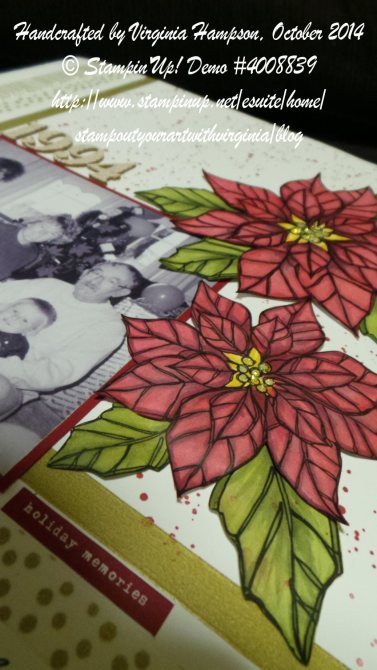
Virginia has created a Hybrid Scrapbook page.  She has used the Poinsettia and Leaf from the ‘Joyful Christmas’ digital stamp Brush set (#135269).  You can print these out using your Microsoft Word programme but you need to print them out using an inkjet printer on Whisper White A4 card stock.  Virginia worked out how many she wanted to colour in and printed a number of them at a time.

     JoyChristmasBrushStampSetDigital                                         49325592b

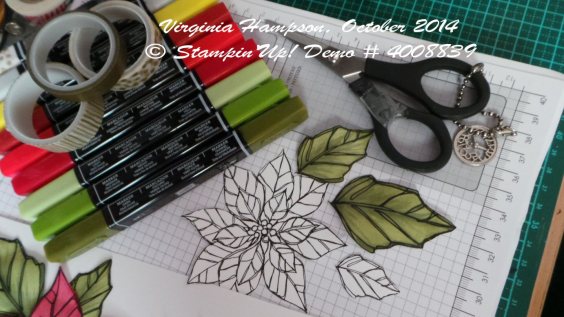
Colouring is so easy using the Blendabilities  to colour in the Poinsettia  in two sizes and the leaf in 3 sizes. These were coloured using the Cherry Cobbler, Old Olive, Daffodil Delight and Smoky Slate Blendabilities alcohol markers. The lightest of the Smoky Slate being used to help give more shading and depth to the colouring.
BlendiesColouringSnips1a

Next after colouring them in, Virginia cut them out with a small pair of paper snips.  Or you may use an electronic die cutting machine if you have one and you are comfortable using it’s print and cut functions.  After she cut them out, she gave the backs of the coloured and cut out image a bit of ‘burnishing’ with the stylus using the scoreboard and bone folder. Doing this makes them more 3d looking.  Just a tip: put the Stampin’ Piercing mat underneath as cushioning.  

To Create the page:

Wirg _ scrap photo

Virginia took three rolls of washi tape (Watercolour Wonder set, main catalogue) and put a strip of each along two edges of the 12×12 so they crossed over in the bottom left hand corner.  These three different rolls of Washi tapes are perfect for any occasion but really shine on a Christmas layout. She layered the black and white photo onto Cherry Cobbler card stock.  Using the ‘Gorgeous Grunge’ stamp set you can stamp the paint splatter with Cherry Cobbler ink to create a background. The coloured in images were then placed around the sheet of 12×12 Whisper White card stock and were adhered using Dimensionals and snail adhesive.

The year 1994 is from the cork stickers from the Project Life Seasonal Snapshot Accessory pack. Using the finest of the Project Life journaling pens, Virginia did a little journaling between the lines of the washi tape.

If you would like a full copy of how Virginia created this layout including how to print out from either MDS or Microsoft Word then send me a message or comment and I will send it out to you.

Now for this week’s special, how about this:

For $70.00, purchase the Cherry Cobbler, Old Olive and Daffodil Delight sets of Blendabilities, the Color Lifter and get the Watercolour Wonder Washi tape pack FREE!

That’s $70 plus postage with Free washi tape (valued at $8.95)  Contact me to place your order!

Thanks for stopping by.

Jenny

My DIgital Studio

ANOTHER DIGITAL BON-VOYAGE!!

A month ago I showed you a Bon Voyage card I made with MDS for my son as he headed off to Fiji for 4 weeks.  You can see that card here if you missed it. I can say he has now returned safely. The day after he returned my daughter set off for China as part of a trip with her Dad’s employer. There are over 100 children from countries all over the world.  She will be away for 3 1/2 weeks (One sad Mumma again!).  It is a big adventure for her at only 13 years, but a fantastic opportunity.  So, with her leaving I had to make another Bon Voyage card (I hope this doesn’t become a regular thing!). Once again I turned to MDS to create it.

My Project 52-001

She loves orange and loves daisies so I thought this was fairly close.  She loved it anyway.  The dotty background was a digital DSP (I can’t remember the name of it now).  The stamp set was the digital ‘Enjoy Every Moment’ for the text and the flowers. I added a couple of other digital stamps.  (I really need to make a note of the stamps I use!).   The speech bubble was a punch which I coloured in Tangerine Tango and added a mat in Daffodil Delight.  I was going to add real bling to it but in the end just went for the Digital Rhinestones.

Have you tried MDS yet?  You can always download the free MDS Trial version and have a play to see how it works. Then if you like it, you can download the software and add your digital elements as you go.  Check out the link to the right for my store and you can see there how you can go about downloading it. If you need any help, just ask me. I will try and help you out.

Thanks for stopping by.

My DIgital Studio

A FAMILY HOLIDAY PAGE!

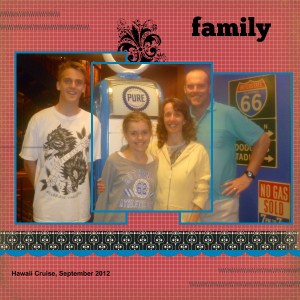
Just a quick post for you.  I really, really should be going to bed RIGHT NOW!!! It was an early start this morning to go to Sydney for the Stampin’ Up! ‘My Digital Studio’ training day.  It was a lot of fun but I have been staring at a computer screen all day.  When I got home tonight though I was really inspired and wanted to create something.  I have been following along with Heather Summers My Digital Studio videos so I thought I would try this technique out.  This is not something we did today but it was fun to try this out.

Hawaii Cruise-001

This is a special family photo taken of our holiday to Hawaii last September.  This technique creates an overlapping of the photos.

Hope you like it!!

Jenny 

Masculine, My DIgital Studio

MDS CARD FOR THE LITTLE BOYS!!!

Just a quick post today.  I thought I would show you this card I made with ‘My Digital Studio’ last week.  This is a fun card for a young boy.  I am sure I have a few young nephews that would like a card like this.

car

This is using ‘On The Go’ Brush Set. I added a digital eyelet to the centre of the wheels.

See the curve ‘Beep! Beep’ Text.  I thought I would tell you how I did that.   This can work with any shape, embellishment or text.  When you click on the shape it comes up with a shape highlighted with dots marking each corner and side points.  If you hover over one of these corner points a directional arrow shows up which enables you to enlarge or shrink the shape.  Notice if you click on a corner there is also a circular arrow that shows up.  If you click or move this shape it will rotate the shape.  You can bend the shape to any angle. I hope I have explained it clearly enough.  One day I will get clever and be able to show pictures to give you a better idea.  It is a really cool application anyway so have a play around yourself.

Thanks for stopping by.  More “Paper” projects next time.

Jenny 

My DIgital Studio, scrapbooking, Stampin' Up!

PLAYING WITH ‘MY DIGITAL STUDIO’

Last week I was playing around with ‘My Digital Studio’ using the Free MDS Trial. Here are a couple of pages I created.  I still have a lot to learn with these but it was fun playing around them.

Here is one with Carlie starting school.

My Project 1-001

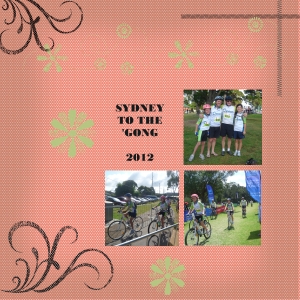
Another page with Carlie’s great bike ride last year completing the Sydney to Gong ride.

Gong Ride

Have you had a go at the Free My Digital Studio yet?  You can download it here and have a play.

I am still in Canberra.  NSW had a great win at the Australian National Gridiron Championships.  After being down at half time 24-7 they had a fantastic second half and beat SA 36-24.  They face ACT today so hopefully another win.  Stay tuned!!!

I will be back on the weekend so I will stop by with some more projects next week.

Jenny

My DIgital Studio

BE-YOU-TIFUL MDS CARD!!!

In the last post I was telling you about playing around with My Digital Studio (MDS).  Well this is the first card I made with it.  I wasn’t sure whether I should show you BUT well I guess you can see it.  This card is very simple and would take you not even 5 minutes to do – if you knew what you were doing!!! This was the first time playing with MDS and I started out having no idea how to use it.  I wanted to show you this because I wanted to reassure you that MDS is OK!!  I dragged things on and changed colours and pressed different buttons BUT it doesn’t blow up your computer if you do something wrong.  There is a wonderful button called “UNDO”. That is my new friend on it.  If you don’t like something, just press “UNDO” even going back 5 or more steps.  It has an amazing memory, better than mine!!!  The other great feature is that they have all the Stampin’ Up! colours to work with even the old retired colours.

Anyway, on to the card.  The flourish is from the brush set ‘Bright Hopes’ and I added an embellished pearl for the centre.  The greeting is from the brush set ‘Fantabulous You’.

Christmas Wreath-001

Now you can play too with a FREE 30 day trial.  Just head to my website HERE and click on SHOP NOW in the top right.  Click on the My Digital Studio and Free MDS trial will come up.  Just fill in a few details and you are on your way.  I will say that at the moment the Download time is taking a little longer than usual, so just be patient.  You have to have a go.  It really isn’t that bad – and remember the ‘UNDO’ button is your friend. 🙂

See you again soon,

Jenny

My DIgital Studio, Stampin' Up!

EXCITING NEWS! MY DIGITAL STUDIO AND SHOPPING ONLINE ARE HERE!!!!

It has been an exciting day!  I can hardly contain myself.  I have not one but TWO announcements for you.

1) You can now Shop Online with me.

2) My Digital Studio is here!!!

Let me tell you all about them.

SHOP ONLINE 24/7

Whenever creativity strikes you can Shop for your Stampin’ up! products.  Head over to my Website  HERE, click on the ‘SHOP NOW‘ Button at the top right and you can shop away.  How exciting!  Shop in your PJ’s.  Don’t forget to Bookmark this site so you can shop anytime.  You might not be thinking straight at 2 am in the morning to think about where you need to go 🙂  I will have the link in the side bar too.

MY DIGITAL STUDIO IS HERE

We have been waiting for this for some time now and FINALLY it is here.  Now you can create cards, tags, scrapbook pages, albums all at your own computer.  My Digital Studio will be $24.95 to download the software program and then you can add to this with extra stamps, brushes, paper etc for a small cost as these are updated by Stampin’ Up! You can check out the new updates every week.  Once you Download them you have it for life.

Digital Designing

Why not have a go at the 30 DAY FREE TRIAL.  To download this, head to my link to the Online store you see above and Click on MDS FREE TRIAL in the Left hand Column.  Give it a try.  It’s a lot of fun navigating around. Here is a card I created today while I was playing around with it.  I still have a bit too learn but it was fun.

birds

If you have any problems or questions drop me an email OR head to the MY DIGITAL STUDIO site for tips, videos or help.

I will show you some more projects as I create them.  I do love playing with real paper and ribbon though so don’t worry there will be PLENTY of those to show you.

Jenny